The platform

Amazon shows you what happened.
AmazeBase tells you what to do about it.

Eight connected modules built on one spine: your real landed cost per unit. Most tools optimise against ACoS. This one optimises against profit after the actual cost of the units you sold.

Advertising & PPC

Every PPC tool shows your ACoS. This one shows your break-even.

Not another dashboard. Every campaign, keyword, search term and placement is judged against the real break-even ACoS for that specific product — then given a verdict, the evidence, and the exact number to change it to.

  • Seven verdicts, each with a written reason — Scale, Optimize, Cut, Hold-flywheel, Negate, Harvest, Review
  • Every recommendation is a from → to. Not “raise the bid” — “$1.40 → $0.90”, editable before you act
  • Hold-flywheel stops you killing the campaign that’s buying your organic rank
  • It won’t let you negate on thin data — it computes how many clicks you actually need from your own margin
  • Inventory gate blocks a Scale when that product is at stockout risk
  • Amazon bulksheet round trip — forty changes in one upload instead of an evening of clicking

And then it grades itself. Every recommendation is stored, matured, and marked worked / didn’t / inconclusive — with effects inside ±5% reported honestly as noise. Everyone gives you recommendations. Nobody else tells you whether theirs worked.
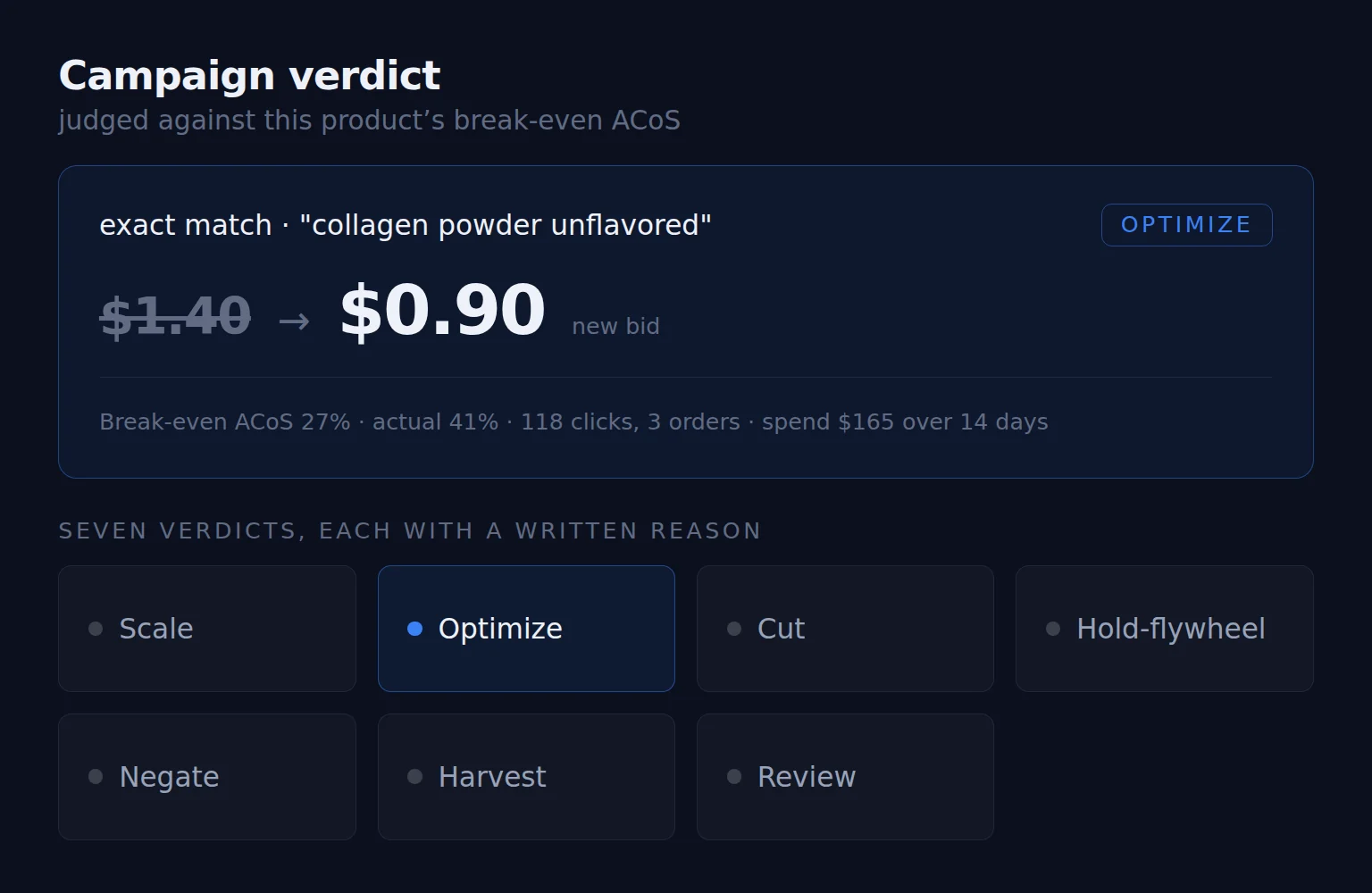
A keyword verdict card lowering a bid from $1.40 to $0.90, with the break-even evidence behind it, above the seven possible verdicts
Financials

Your sales report is not your profit.

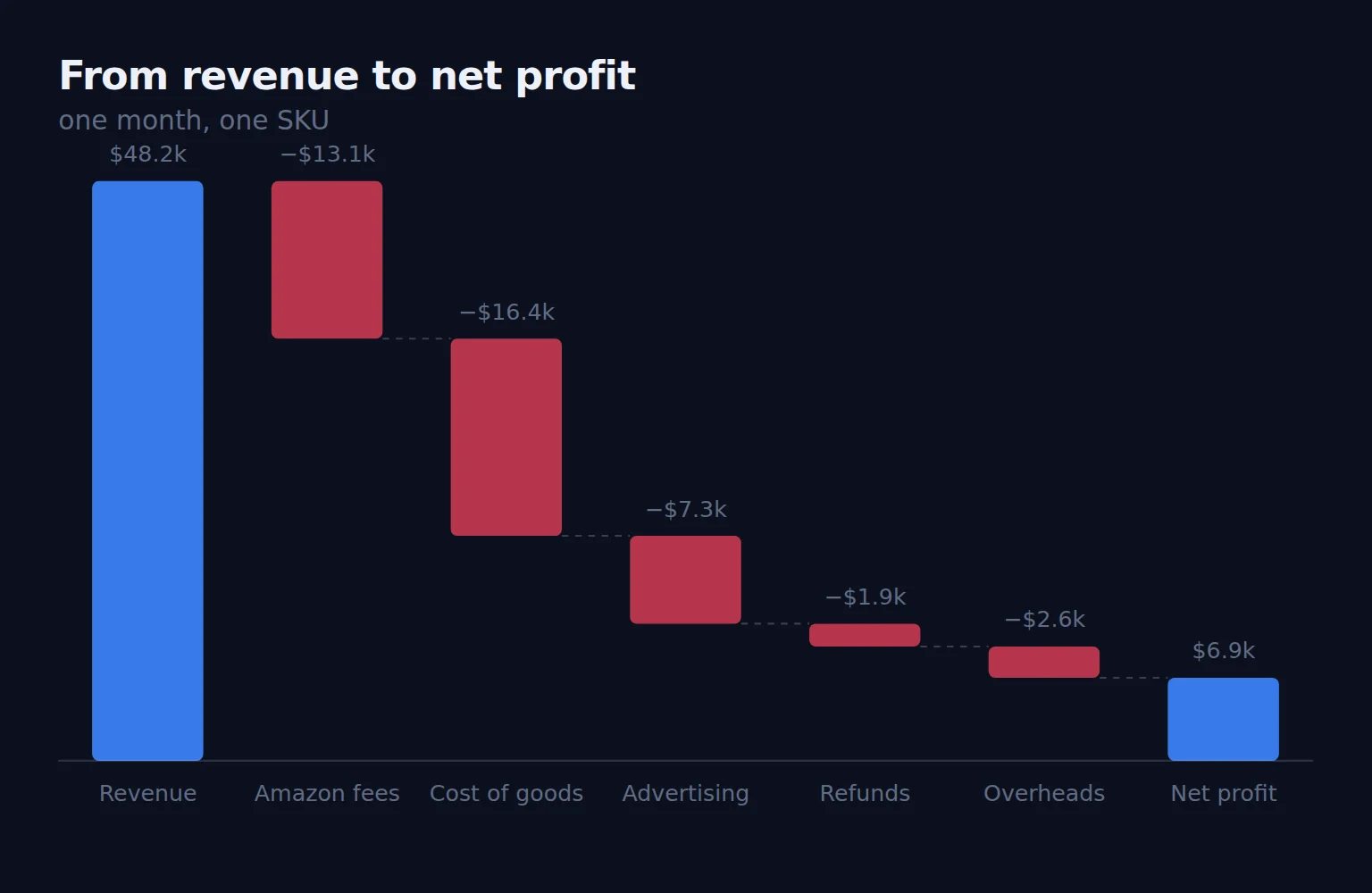
Your settlement export, rebuilt into a real P&L: revenue, minus Amazon’s full fee stack, minus what the goods actually cost you, minus ads, refunds and the overheads you type in. By month. By SKU.

  • Amazon fees broken into eight lines — selling, FBA, inbound, international, removal, storage, subscription, other
  • Two profit numbers — contribution profit and net profit, because they answer different questions
  • Drag-to-reorder KPI cards with prior-period comparison
  • Charts that ask questions in English — “Am I buying my sales?”, “Does Amazon cover my overheads?”
  • Overhead tracking that flags the month where a recurring cost went missing

Seller Central knows your sales and fees. It has no idea what your units cost, what you paid in freight and duty, or that you pay for software and a VA. So “revenue up 30%” stops being a number you take on faith.

A waterfall from revenue down through Amazon fees, cost of goods, advertising, refunds and overheads to net profit
Ledger

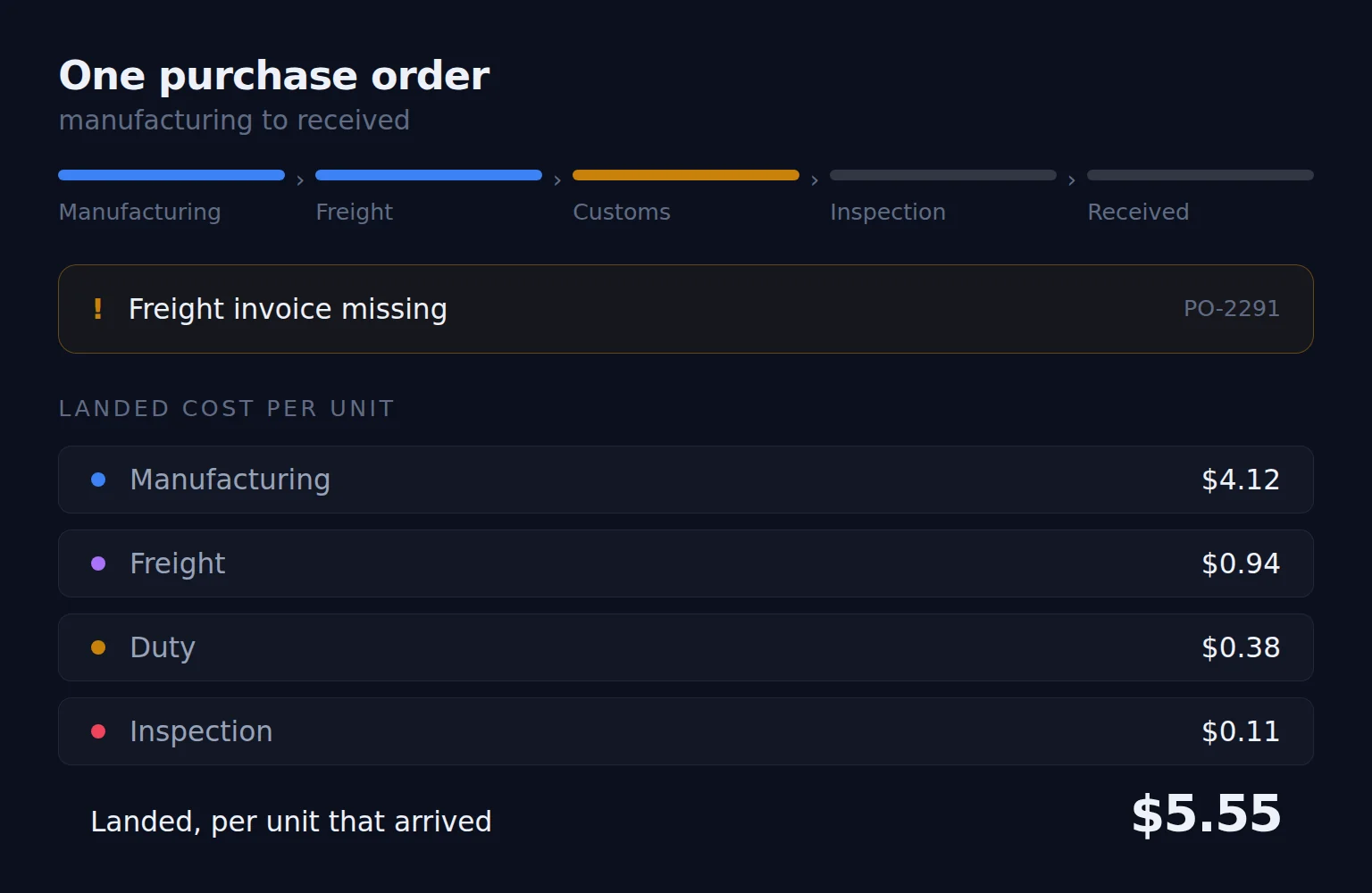
It knows your freight invoice is missing — and which PO it belongs to.

The system of record for every dollar spent acquiring inventory. Purchase orders, freight, customs, inspection, receipt — assembled into a true landed cost per unit. This is what makes every other number in the product real.

  • Landed cost per unit from manufacturing, freight, duty and inspection, divided by the units that actually arrived
  • Completeness score driven by your incoterm — a CIF order should have customs attached, and it tells you when one doesn’t
  • Confidence badge — “Ordered 500, received 480. Cost-per-unit reflects 480.”
  • Smart attribution — attach an invoice and it suggests the likely PO: “matches SKU-A, 12d gap”
  • Auto-route scans your Amazon transactions and creates the fee rows for you

Every “profit” figure in every Amazon tool is a guess until this exists. Get landed cost wrong and your margins, your break-even ACoS and your reorder decisions are all wrong together.

A purchase order moving through manufacturing, freight, customs, inspection and receipt, with a missing freight invoice flagged and the landed cost per unit built up beneath it
Inventory

Not “you’re low on stock.” The last day you can safely order.

Answers the two questions that cost the most money — when do I have to place the order, and how many units — then hands that decision straight to a pre-filled purchase order.

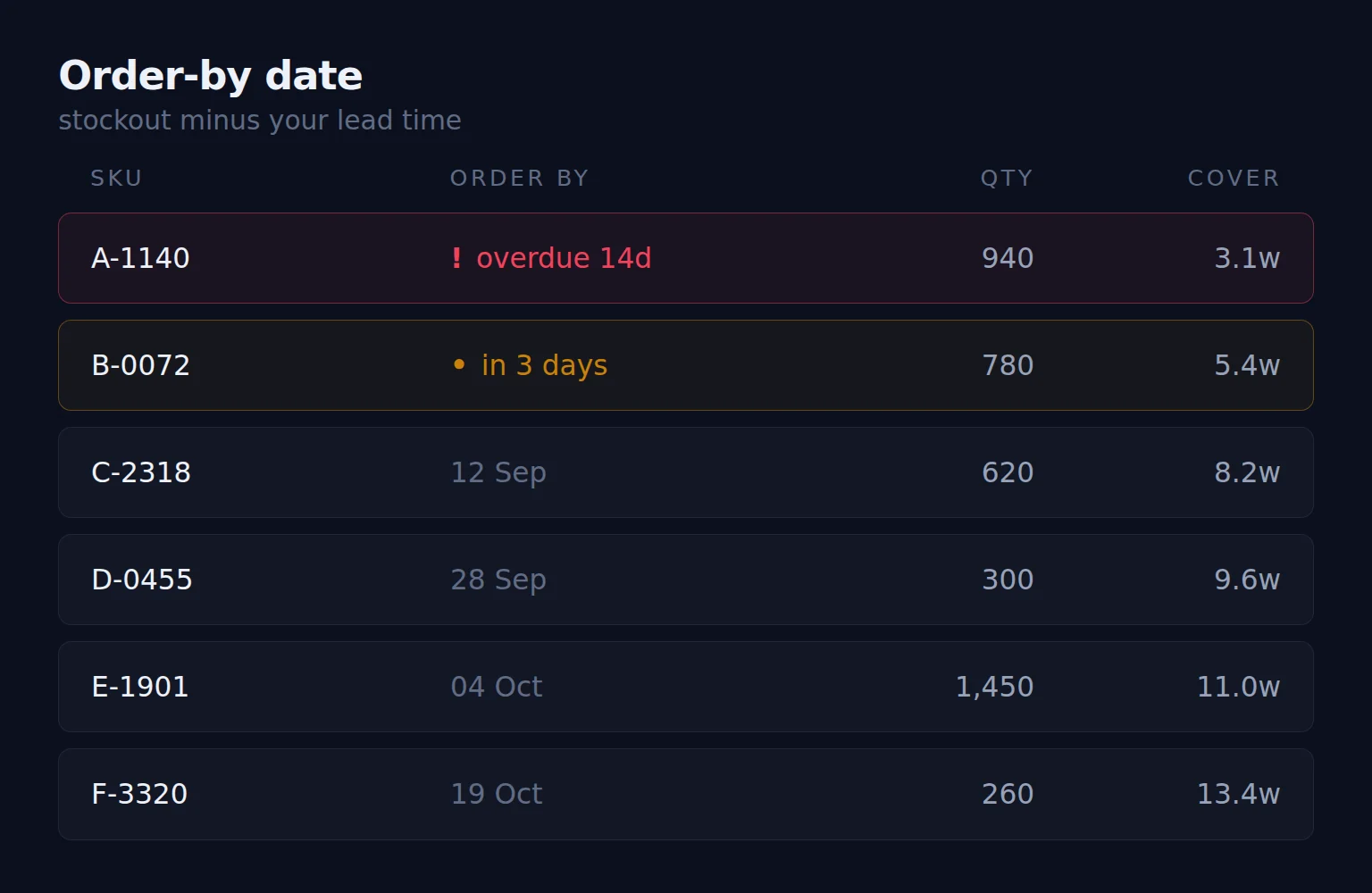
  • Order-by date is stockout minus your lead time, and turns red with “overdue 14d” when you’ve missed it
  • Suggested quantity from velocity, lead time and your cover target
  • Velocity window you choose — 30, 60 or 90 days
  • Honest defaults — “using default 90d lead time — set yours”, and the maths still runs either way
  • One click to a PO, pre-filled with the reasoning that produced it

A stockout is the most expensive mistake on Amazon: you lose the sales, then the rank, then months of ad budget buying the rank back. Overstock is the second most expensive. This module exists to give you one date and one number, early enough to act.

A reorder table showing the last safe order date per SKU, with one row overdue by 14 days
Product Research

A big market you can’t profit in is not an opportunity.

A workbench for products you haven’t launched. Import your existing research exports, score the opportunity across four dimensions, and model the unit economics down to the tariff line.

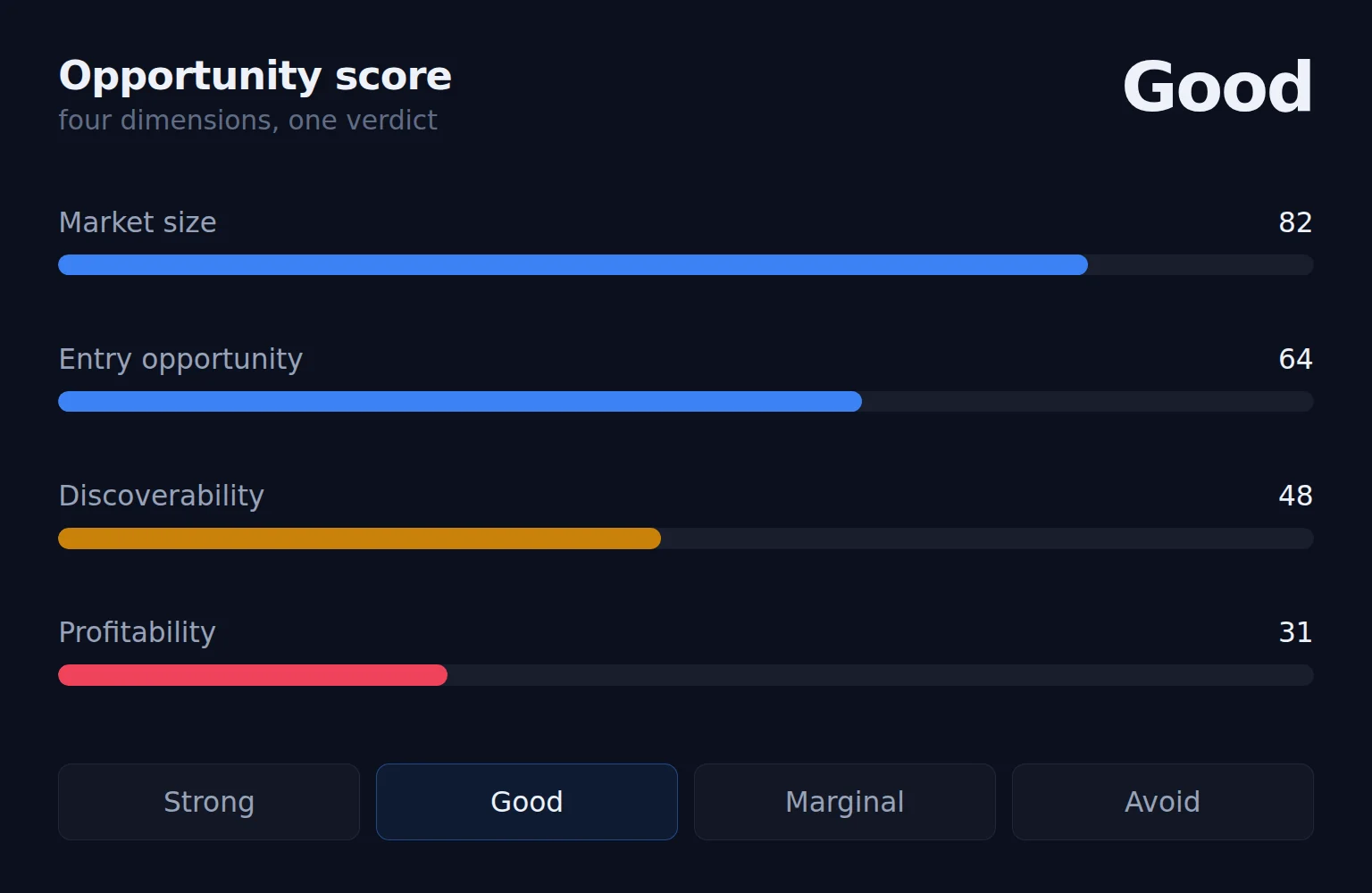
  • Opportunity score across market size, entry opportunity, discoverability and profitability — verdict Strong / Good / Marginal / Avoid
  • Four-step profit model ending in landed cost, margin, ROI and a plain verdict
  • Tariff and Section 301 lines — the ones that quietly kill China-sourced margin
  • Launch-phase TACoS, because what you’ll pay in quarter one isn’t what you’ll pay in year two
  • Compare candidates across fourteen selectable columns

Most research tools tell you the market is big. None of them tell you whether you’ll make money in it. This runs the market data and the unit economics in the same place — before you wire the deposit.

An opportunity score across market size, entry opportunity, discoverability and profitability, resolving to a verdict of Good
Simulations

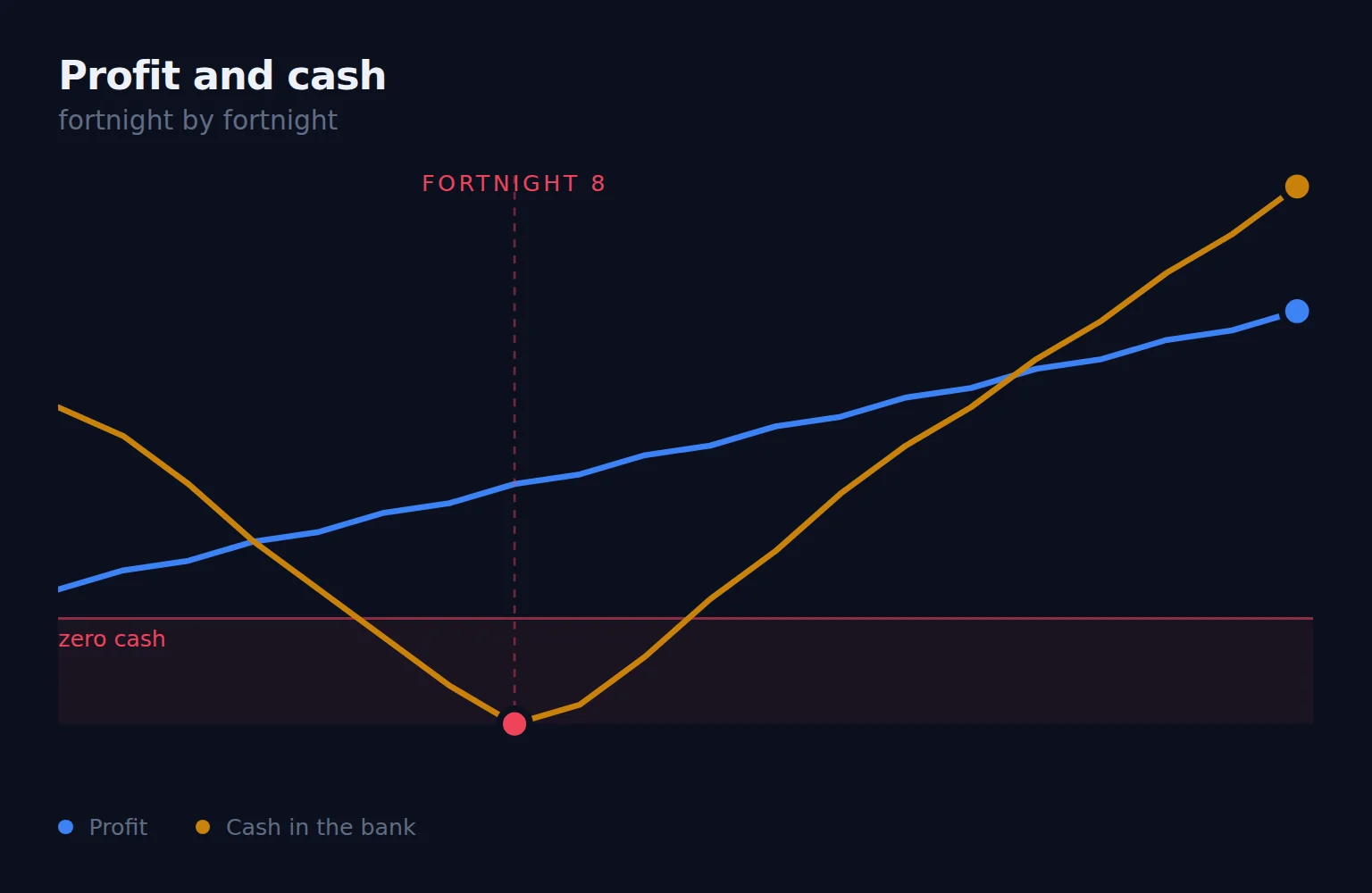
You can be profitable and still run out of money.

Simulates your business forward, fortnight by fortnight: place the order, pay the supplier in instalments, wait for production, wait for shipping, ramp sales, pay PPC, get paid by Amazon, reorder. Then shows you the two lines that matter.

  • Three-leg lead time — production, shipping, Amazon check-in, modelled separately
  • Supplier payment schedules with trigger-based instalments
  • Automatic reorder placement mid-simulation: “reorder placed Fn7 → arrives Fn12”
  • Three lenses — cashflow, profitability, inventory — where a drop to zero is a stockout
  • Out-of-cash flags per fortnight, in plain language

Growth kills more Amazon businesses than failure does. You sell out, reorder bigger, and find the deposit is due before Amazon pays you. This is where you discover that on a screen instead of in your bank account.

Profit rising steadily while cash in the bank dips below zero at fortnight 8
Sales

How much of this SKU’s revenue are you renting?

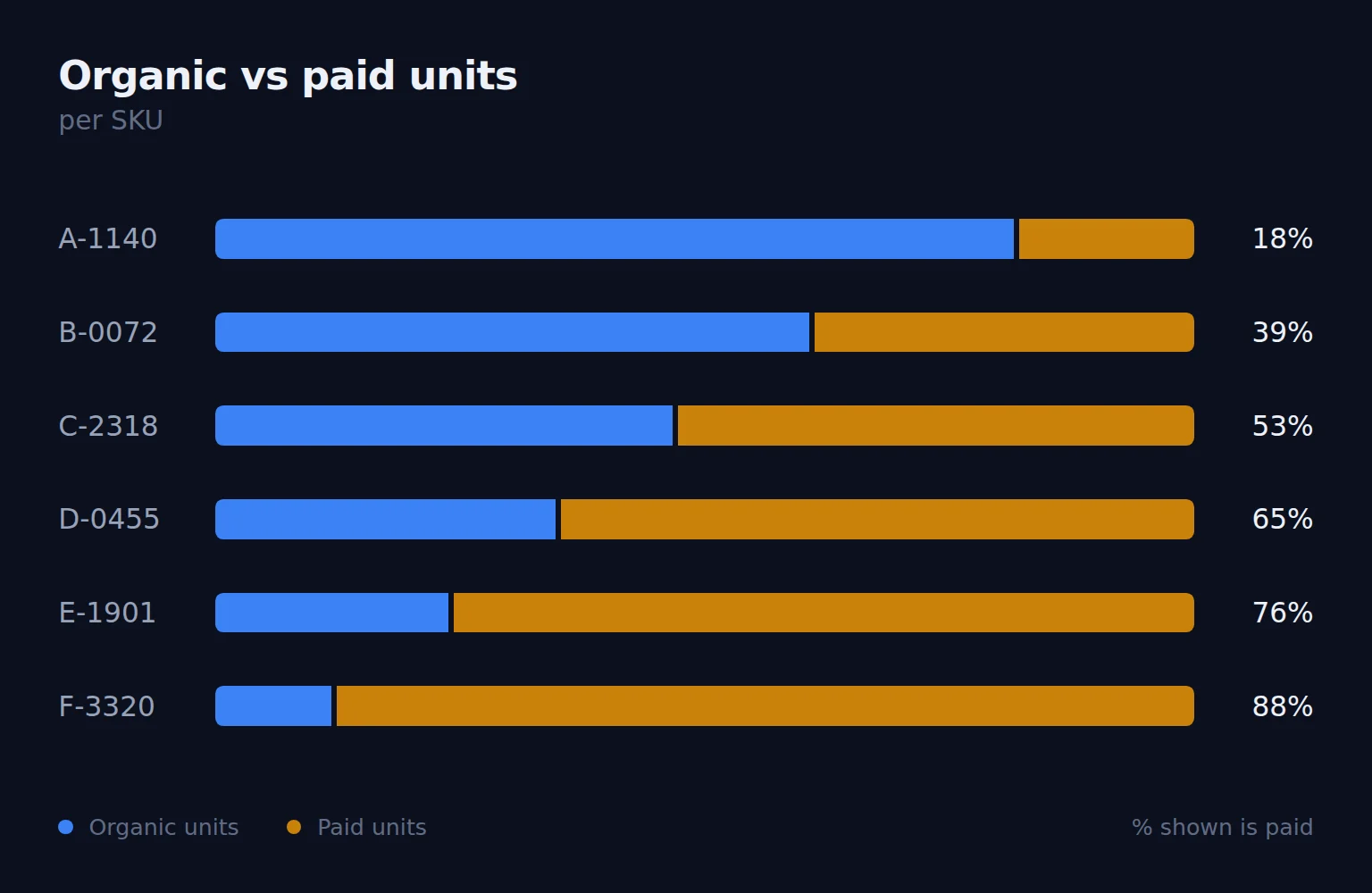
Per-SKU performance with the split that actually changes decisions: how many units were bought organically, and how many you paid for.

  • Organic vs PPC unit split per SKU
  • Revenue, profit, margin, ACoS, TACoS, ROAS and refund rate in one table
  • Monthly trend per SKU by revenue, units, profit or TACoS
  • Jump straight into Ads or Financials from any row
  • Honest labelling — recent organic units are marked estimated, because the attribution window hasn’t closed

A SKU doing $40k a month where 80% of units come through ads is a completely different business from one where 20% do. This shows you which one you own.

Organic against paid units per SKU, showing how much of each SKU's revenue is bought rather than earned
Data & Sync

If two Amazon reports disagree, we tell you.

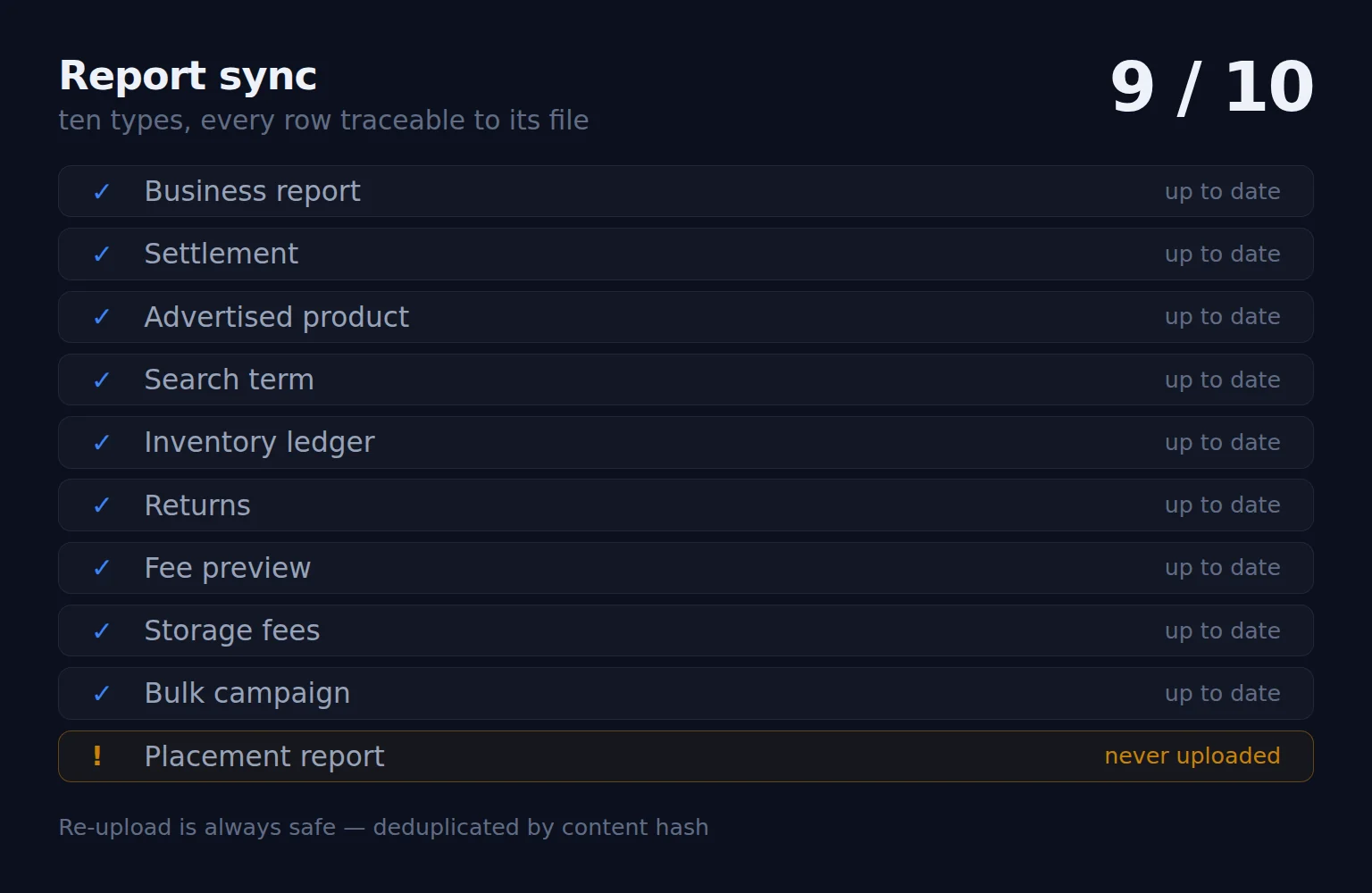
Ten report types ingested, every row traceable to the file it came from. The foundation the rest of the product stands on.

  • Re-upload is always safe — deduplicated by content hash, so double-uploading can never corrupt your data
  • Locale-aware parsing — European decimals, Spanish filenames and headers, day-first dates
  • Automatic reconciliation cross-checks ad reports against settlement data and raises a flag when they disagree
  • Full provenance — every row knows which file it came from and when
  • Organic rank import, the one thing Amazon has no API for

Amazon’s own reports contradict each other more often than sellers realise. You get told, rather than quietly getting a wrong answer.

Ten Amazon report types with nine up to date and one never uploaded
Security

Your Amazon data, treated like it’s ours to protect

You’re about to connect years of sales, cost and supplier information to a tool you didn’t build. Here is exactly what protects it.

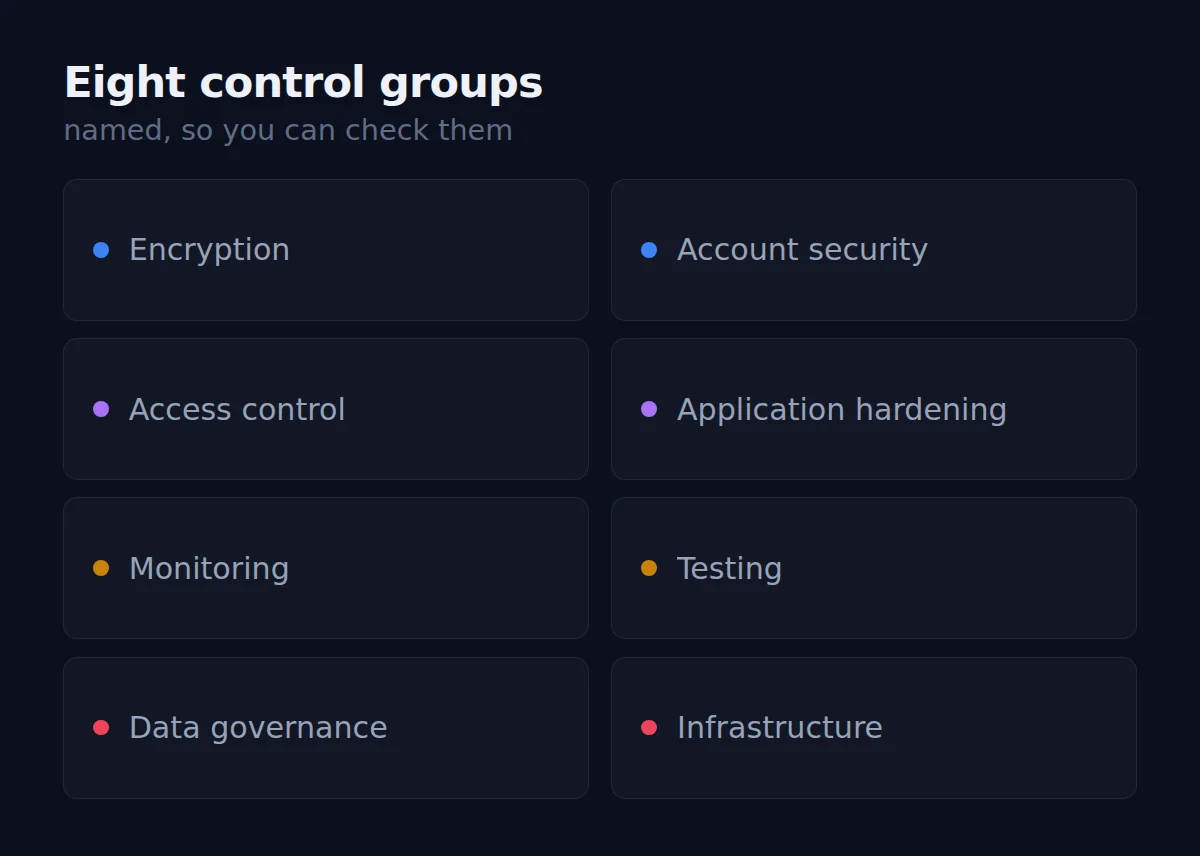
Most software asks you to take security on faith. We’d rather name the controls and let you check them.

Everything below is running in the product today. Where something is still being built, we say so rather than implying otherwise — because a security page you can catch out is worse than no security page at all.

The eight named security control groups - encryption, account security, access control, application hardening, monitoring, testing, data governance and infrastructure

Encryption

  • TLS 1.2+ on everything in transit
  • AES-256 at rest
  • Amazon credentials encrypted again at record level
  • HSTS enforced

Account security

  • Two-factor authentication, mandatory
  • Password complexity, history and expiry enforced
  • Automatic lockout after repeated failures
  • One-way password hashing
  • Short-lived sessions you can revoke
  • Rate limiting on authentication

Access control

  • Tenant isolation checked on every request
  • Three-tier permissions
  • Per-module permissions
  • Owner-only administrative functions
  • Support access scoped, time-limited and logged

Application hardening

  • CORS locked to an explicit allowlist
  • Full security header set
  • Upload type allowlist and size caps
  • Parameterised database access
  • XSS-aware rendering

Monitoring

  • Audit trail of sign-ins and privileged actions
  • Emails hashed before they reach logs
  • Automated detection with real-time alerting
  • Dark-web credential monitoring
  • Manual log review on a fixed cycle
  • Written incident response plan

Testing

  • Static analysis and dependency scanning on every change
  • Scheduled dynamic scanning
  • Controls deliberately triggered and their audit records verified

Data governance

  • Classification and retention policy
  • Retention enforced automatically
  • You control deletion, with a recovery window
  • Pseudonymisation where financial records must be kept

Infrastructure

  • Hosted on SOC 2 Type II infrastructure
  • Data processing agreement in place, provider assessed as subprocessor
  • Private internal networking
  • Built against Amazon’s SP-API Data Protection Policy

We name controls, not configuration. Thresholds, session lifetimes, internal endpoints and the tools we use stay private — publishing those would help an attacker more than it helps you. See the Privacy Policy for how data is handled, and the Terms of Service for the commitments behind it.

AI Assistant

Stop reading reports.
Start asking questions.

Ask a question and get an answer built from your own connected data, with the numbers behind it.

Join the Wait List
How much inventory should I order for Portable Coffee Grinder next month?
I recommend ordering 640 units.

This will cover demand for 36 days, avoid stockouts, and maintain healthy cash flow.

Demand Forecast620 units
Days of Coverage36 days
Est. Profit$4,820
Cash Impact−$2,950

Illustrative example — the AI Assistant is not yet available.

Early access

Join the wait list

We’ll email you when your marketplace opens up. No spam, and no payment details.